
-
What is the CO2 laser, and why does a fiber UV laser keep coming up?
-
Step 1: Name the material and thickness before you name the brand
-
Step 2: Choose wavelength, not just wattage
-
Step 3: Right-size the power by your part mix, not by pride
-
Step 4: Stock Bystronic laser consumables before you need them
-
Step 5: Treat the laser like the safety hazard it is
-
Step 6: Run a cut test and log consumables
-
Last notes from the trenches
I coordinate replacement parts and emergency service for a sheet metal fabrication shop. In the last three years, I've handled over 200 rush orders—some with a 36-hour lead time, one with a Friday-afternoon panic and a Monday deadline. Most of them were not machine failures. They were wrong assumptions about lasers and consumables.
When I'm triaging a rush order, I ask three questions in order: how much time do we have, can we source the part in that window, and what is the worst case if we miss it. This checklist is for anyone trying to answer two related questions: 'what is the CO2 laser, actually?' and 'should I buy an industrial fiber laser like the Bystronic BySmart Fiber 4kW fiber laser, or something smaller?' Here are the six checks I run through whenever a shop gets confused.
What is the CO2 laser, and why does a fiber UV laser keep coming up?
A CO2 laser is a gas laser. It creates a beam from a gas mixture that includes carbon dioxide, nitrogen, and helium, excited by an electrical discharge. The output wavelength is about 10.6 μm. That's deep infrared, which is why a CO2 beam cuts and engraves wood, acrylic, paper, glass, and some plastics so well.
It can cut metal too, but the practical setup changes a lot with power. An industrial CO2 cutter might run 3 to 6 kW or more. A 40W CO2 laser is usually a desktop machine used for engraving, thin acrylic, and light cuts. It is not a sheet metal production tool.
So when someone searches 'laser 40watt co2,' I always stop and ask: what do you actually need the laser to do?
A fiber UV laser? That's a third category. 'UV fiber' usually means a pulsed solid-state laser with a wavelength around 355 nm, used for marking, micro-cutting, and cold ablation. It's not what Bystronic uses for sheet metal cutting. It's a different tool for a different job.
Step 1: Name the material and thickness before you name the brand
I don't care if it's Bystronic or another brand; the first question is: what is this machine mostly cutting? Mild steel? Stainless? Aluminum? What thickness?
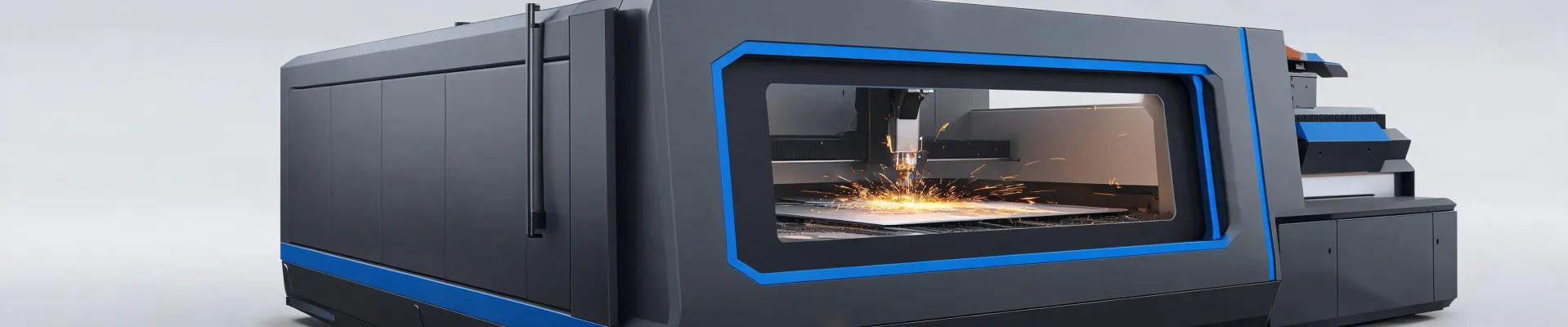
For a shop doing mixed sheet metal work, a Bystronic BySmart Fiber 4kW fiber laser is a balanced machine. It handles mild and stainless steel from about 1 to 12 mm without much drama, and with the right gas setup it cuts aluminum too. But if you're cutting 20 mm plate all day, I'd pick a different machine. Don't hold me to exact speed tables—cutting speed depends on material composition, nozzle, gas, focus, and all the other details—but 4kW is a realistic 'first serious fiber' for many contract shops.
Step 2: Choose wavelength, not just wattage
Most buyers ask 'how many watts?' The better question is 'what wavelength is this laser, and does it suit the material?' Wavelength is what determines how energy is absorbed.
- CO2 laser at 10.6 μm: Great for non-metals. On thicker metal, a high-power CO2 can be excellent, though operating costs tend to be higher than fiber.
- Fiber laser at about 1.07 μm: Better absorbed by steel, which means faster cutting and lower electricity use for typical sheet metal thicknesses.
- UV fiber laser around 355 nm: Mostly for precision marking and micro-processing, not for heavy plate.
This is why 'which is better, CO2 or fiber?' is the wrong question. The right question is 'which wavelength matches my material?'
Step 3: Right-size the power by your part mix, not by pride
Here's where search ads cause the most damage. Someone sees an industrial Bystronic BySmart Fiber 4kW, then searches 'laser 40watt co2' because a desktop engraver came up. Those machines live in different universes.
A 40W CO2 laser is a useful, small-shop tool. It's fine for engraving tumblers, cutting 3 mm acrylic, and making prototypes. It is not a replacement for a 4kW fiber cutter, and a 4kW fiber cutter is not the best first laser for a hobby shop.
I've been on the small side of this. When I was starting out, the vendors who took my $300 orders seriously are the ones I still call when we need bigger parts. Small doesn't mean unimportant. It means potential.
Step 4: Stock Bystronic laser consumables before you need them
Most downtime isn't the resonator. It's a dirty protective window, a worn nozzle, a bad O-ring, or contaminated gas. Filtering the machine by brand is fine, but you have to stock the consumables the brand expects.
What I keep in the Bystronic laser consumables drawer:
- Nozzles in the sizes your cutting head settings need—not just the one that came with the machine.
- Protective windows or cover glasses. One spatter event can ruin the one in the head.
- Focus lenses, if your machine uses consumable lenses.
- Ceramic rings and O-rings for the cutting head, if applicable.
- Filters and gas-related parts from the Bystronic service schedule.
And the overlooked step: verify assist gas purity, especially nitrogen and oxygen. A bad gas bottle can make a brand-new laser look like a broken one. Most buyers focus on the machine and completely miss the gas.
In March 2024, we had a cutting head down 36 hours before a deadline. The lens was fine, the nozzle was fine, and the protective window had a hairline crack from spatter. The normal order would take four to five days. We paid for overnight freight, fixed it, and saved the job. The lesson wasn't 'cheap vs expensive consumables.' It was 'use the right part number before you assume the whole laser is broken.'
Don't hold me to current part numbers or prices—Bystronic updates their list and prices vary by region. Check the manual and your local service center before ordering. As of early 2025, buying direct or through an authorized distributor is the fastest route I know.
Step 5: Treat the laser like the safety hazard it is
If you're in the U.S., ANSI Z136.1 is the reference for safe laser use. It's not optional. A 4kW fiber laser is a Class 4 laser; a 40W CO2 laser is also Class 4 in most open configurations. Direct and reflected beams can cause permanent eye damage and start fires—even a diffuse reflection can be dangerous under some conditions.
Different wavelengths need different protection: 10.6 μm for CO2, around 1064 nm for fiber, and UV-rated glass for 355 nm. Don't buy one pair of 'laser goggles' and call it done. Check the wavelength on the frame.
Step 6: Run a cut test and log consumables
The step most people skip is the cut test. I don't mean a pretty demo part. I mean a part with your actual material, your actual tolerances, and your actual assist gas. Mark the date, note the settings, and keep a sample. When the next job looks wrong, you can compare instead of guessing.
I knew I should do a final focus check before a big run, but thought 'what are the odds? It's the same setup as yesterday.' The odds caught up with me. $400 in scrap and a missed deadline later, we now treat the focus check as non-negotiable.
Last notes from the trenches
My experience is based on sheet metal fabrication, mostly mild steel and stainless up to around 12 mm, plus some aluminum. If you're working with medical components, microelectronics, or polymer films, the UV fiber laser world has a different checklist. I can't speak to that from hands-on time.
But the same logic applies: know the material, match the wavelength, be honest about power, and never let the consumables drawer get empty.
Bottom line: when people ask 'what is the CO2 laser?', the short answer is a 10.6 μm gas laser that still has a place in this industry. The longer answer is that your laser choice should start with the material, not a number of watts. A Bystronic BySmart Fiber 4kW fiber laser and a 40W CO2 engraver are both real machines. They're just not interchangeable.
At least, that's been my experience in a world of rush orders and last-minute spares. If your experience differs, that's fine. The machine will always surprise you sooner or later.

Jane Smith
I’m Jane Smith, a senior content writer with over 15 years of experience in the packaging and printing industry. I specialize in writing about the latest trends, technologies, and best practices in packaging design, sustainability, and printing techniques. My goal is to help businesses understand complex printing processes and design solutions that enhance both product packaging and brand visibility.